Create Poll
Overview
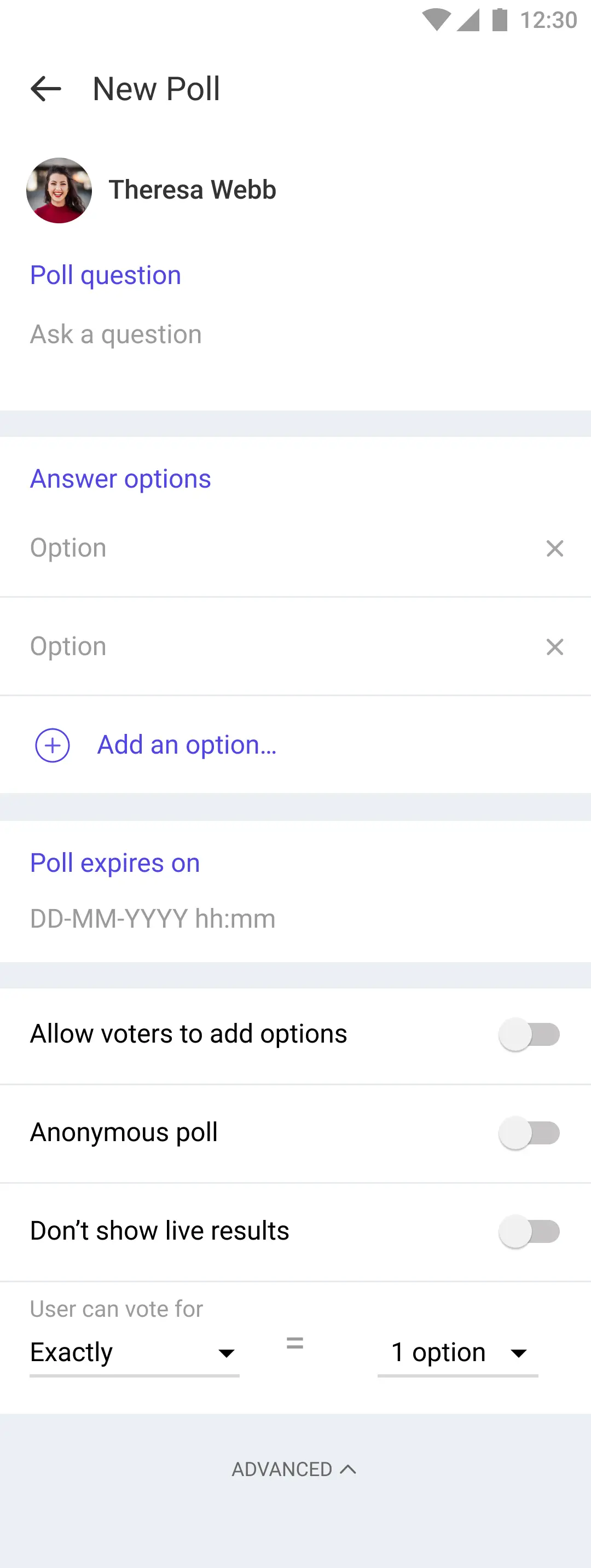
The LMFeedCreatePollScreen allows users to create poll by adding question, options. It provides various UI components and functionalities to facilitate the poll creation process.
File Location:
LMFeedCreatePollScreen.swift
Functionality
Protocols
LMFeedCreatePollProtocol
This protocol defines methods for poll related events:
updatePollDetails(with data: LMFeedCreatePollDataModel): Called when the user has created a poll and taps the "Done" button.cancelledPollCreation: Called when the user taps on "Cancel" button.
Protocols Implemented
UI Components
containerView: The main container view.containerScrollView: A scroll view that contains a vertical stack view for laying out the UI componentscontainerStackView: Vertical stack view holding all UI componentspollQuestionHeaderView: Instance ofLMFeedCreatePollHeaderfor entering the poll questionpollOptionView: Instance ofLMFeedCreatePollQuestionViewfor entering poll optionspollExpiryDateView: Instance ofLMFeedCreatePollDateViewfor setting the poll expiry datepollMetaOptionsView: Instance ofLMFeedCreatePollMetaViewfor additional poll options (hidden by default)
Data Variables
pollDelegate: LMFeedCreatePollProtocol? - Delegate for poll creation events.
Action Handlers
onTapAdvancedOption()- Toggles the visibility of advanced options.openDatePicker()- Opens the date picker for poll expiry.didTapDoneButton()- Validates and submits the created poll.
Customization
CustomCreatePollScreen.swift
class CustomCreatePollScreen: LMFeedCreatePollScreen {
   override func setupAppearance() {
       super.setupAppearance()
       view.backgroundColor = .lightGray
   }
}
AppDelegate.swift
func application(_ application: UIApplication, willFinishLaunchingWithOptions launchOptions: [UIApplication.LaunchOptionsKey: Any]? = nil) -> Bool {
   Components.shared.createPollScreen = CustomCreatePollScreen.self
   // ...
   return true
}