<?xml version="1.0" encoding="utf-8"?>
<feed xmlns="http://www.w3.org/2005/Atom">
    <id>https://docs.likeminds.community/tutorials</id>
    <title>LikeMinds Docs Blog</title>
    <updated>2024-10-08T15:00:00.000Z</updated>
    <generator>https://github.com/jpmonette/feed</generator>
    <link rel="alternate" href="https://docs.likeminds.community/tutorials"/>
    <subtitle>LikeMinds Docs Blog</subtitle>
    <icon>https://docs.likeminds.community/img/Likeminds-Favicon-32x32.png</icon>
    <entry>
        <title type="html"><![CDATA[How to Integrate AI Chatbot with LikeMinds Chat SDK]]></title>
        <id>https://docs.likeminds.community/tutorials/integrate-ai-chatbot-with-likeminds-chat-sdk</id>
        <link href="https://docs.likeminds.community/tutorials/integrate-ai-chatbot-with-likeminds-chat-sdk"/>
        <updated>2024-10-08T15:00:00.000Z</updated>
        <summary type="html"><![CDATA[In this guide, we will cover the steps to integrate an AI chatbot with LikeMinds Chat SDK, including chatbot setup, managing conversations, and handling AI responses, to create a dynamic, intelligent chat experience in your application.]]></summary>
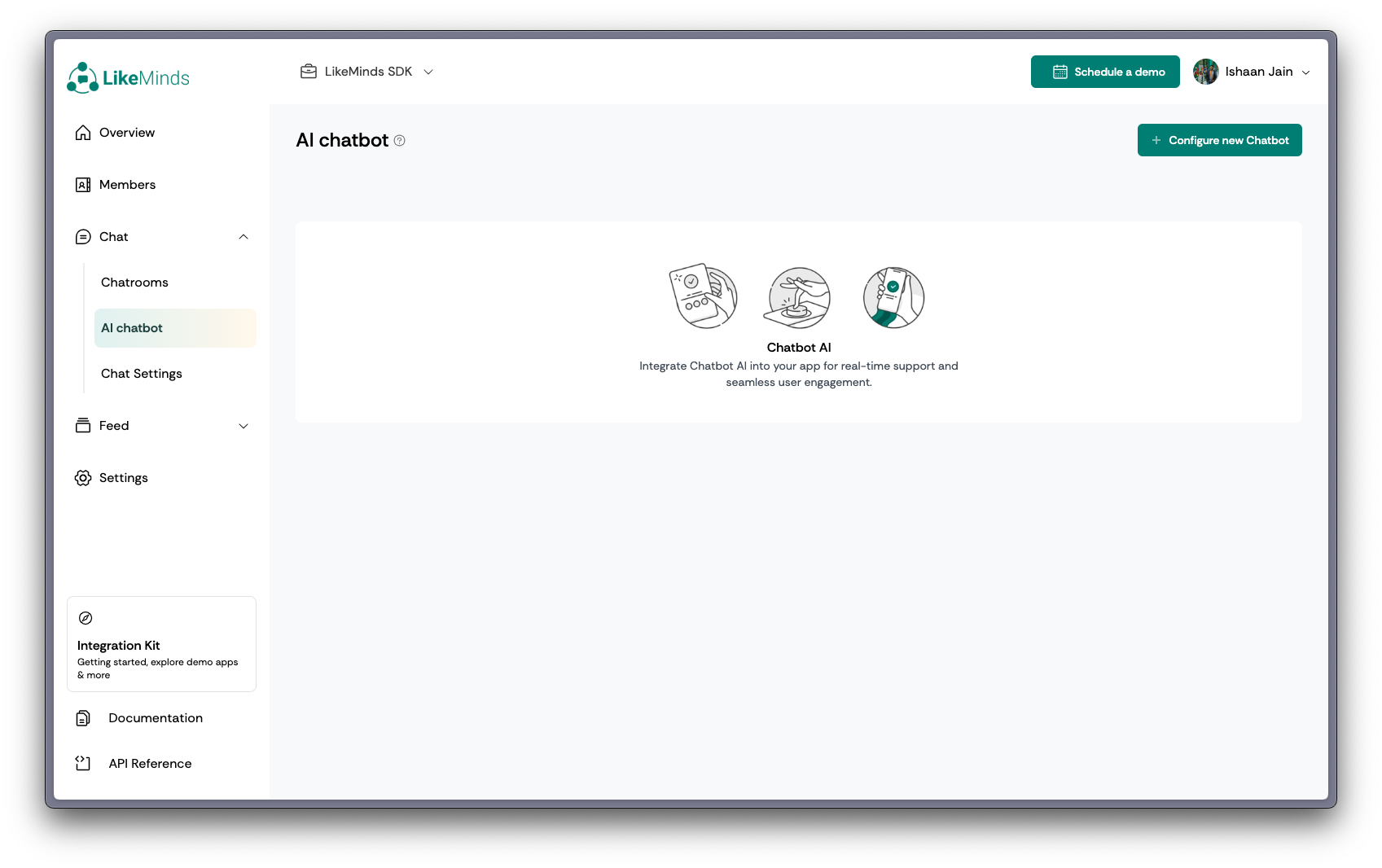
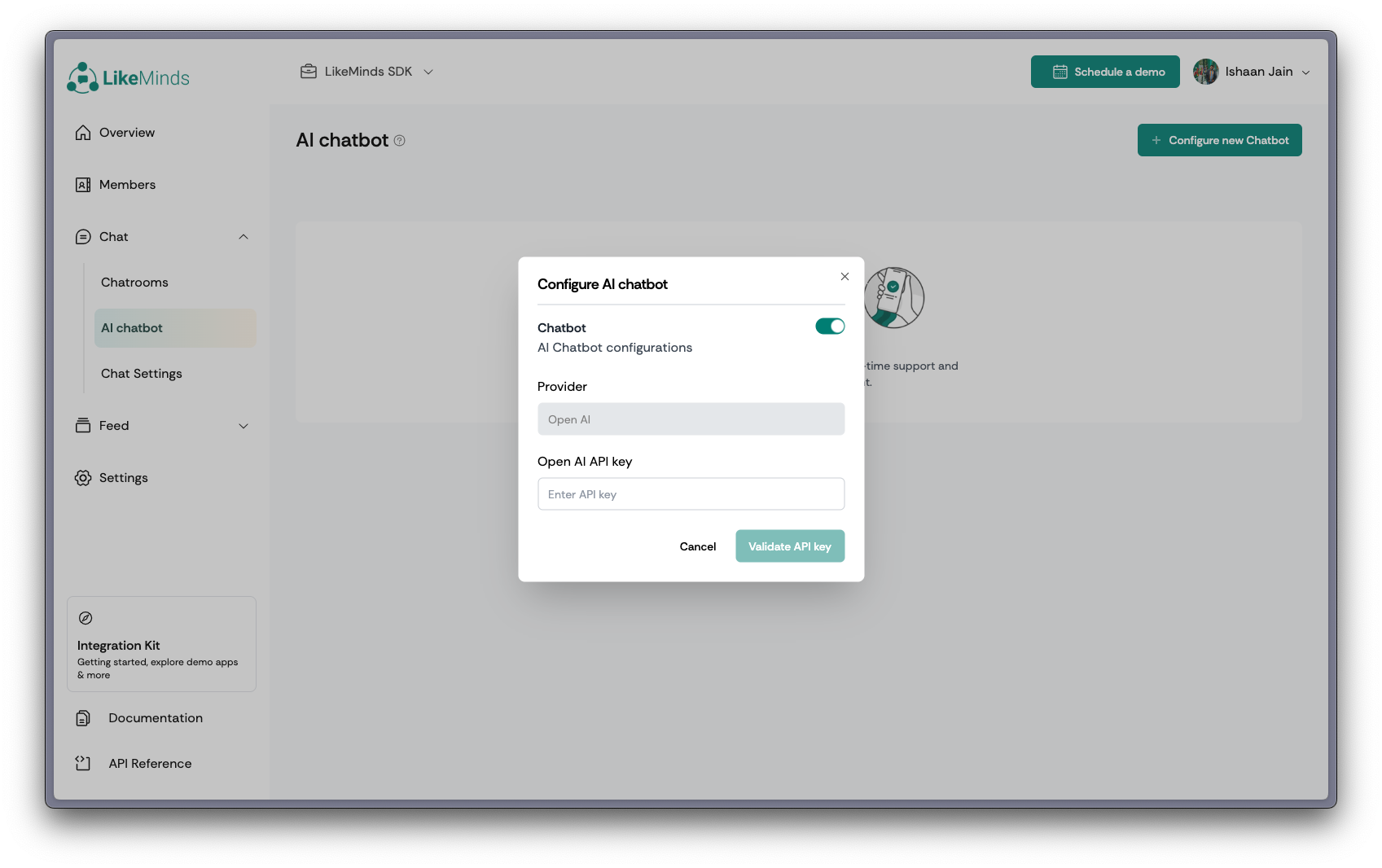
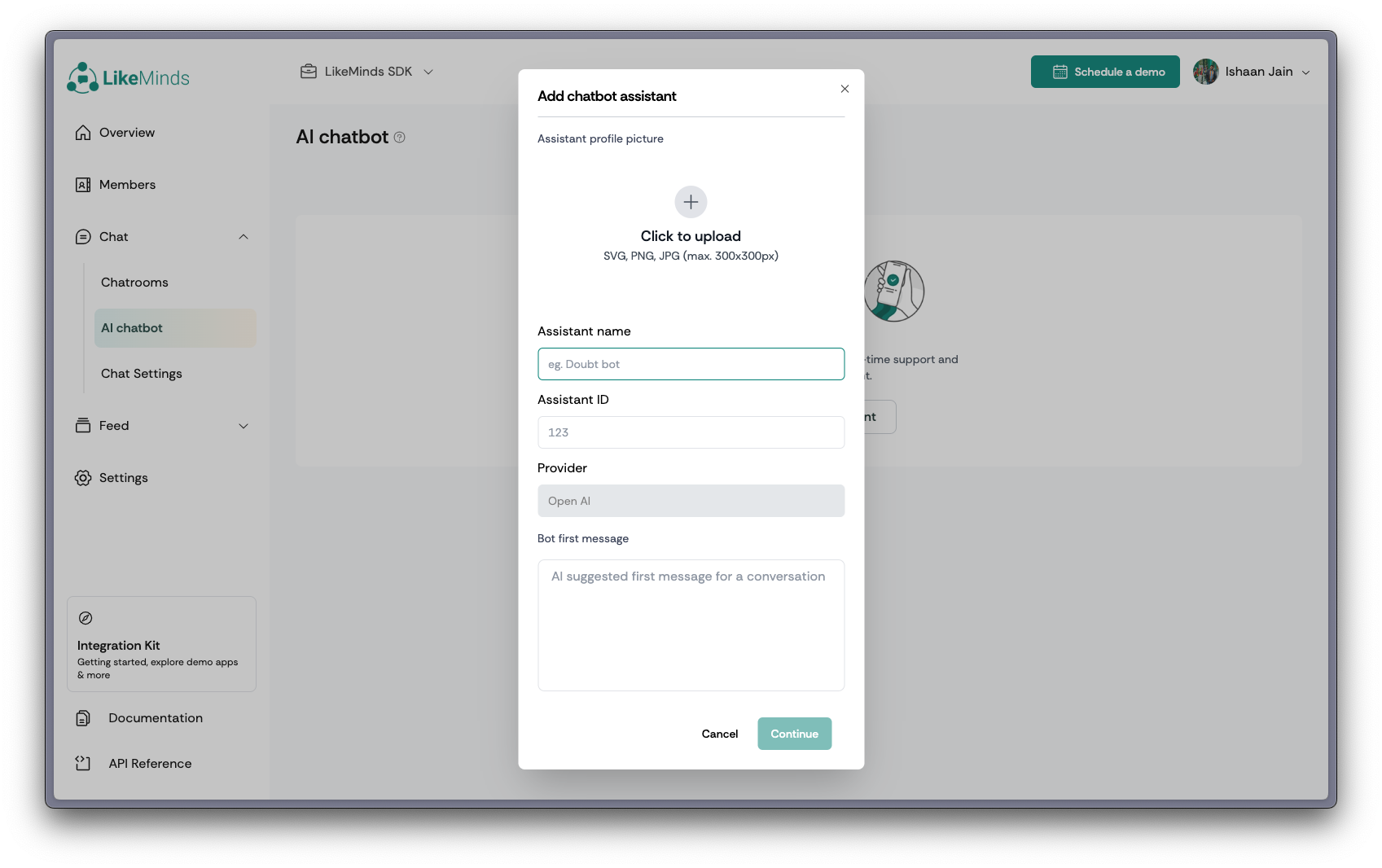
        <content type="html"><![CDATA[<p>In this guide, we will cover the steps to integrate an AI chatbot with LikeMinds Chat SDK, including chatbot setup, managing conversations, and handling AI responses, to create a dynamic, intelligent chat experience in your application.</p><h2 class="anchor anchorWithStickyNavbar_LWe7" id="step-1-create-an-open-ai-assistant-on-the-openai-platform">Step 1: Create an Open AI Assistant on the OpenAI Platform<a href="#step-1-create-an-open-ai-assistant-on-the-openai-platform" class="hash-link" aria-label="Direct link to Step 1: Create an Open AI Assistant on the OpenAI Platform" title="Direct link to Step 1: Create an Open AI Assistant on the OpenAI Platform">​</a></h2><p>To begin, you'll need to create an AI Assistant on the OpenAI platform. This assistant will help developers with their queries regarding API and SDK integration for feed and chat products. The assistant will leverage a vector store containing documentation files to provide accurate and contextually relevant responses. Follow these steps to set up the assistant:</p><ol><li><p><strong>Sign Up/Login to OpenAI</strong>: Visit <a href="https://platform.openai.com/" target="_blank" rel="noopener noreferrer">OpenAI</a> and sign up for an account or log in if you already have one.</p></li><li><p><strong>Access API Settings</strong>: Navigate to the API section from the dashboard.</p></li><li><p><strong>Create a New API Key</strong>: Generate a new API key for your AI Assistant, which will be used for authentication and interaction with your chatbot. Save this API key for sharing it to LikeMinds via REST-API.</p></li><li><p><strong>Define Your Model</strong>: Select a suitable language model (e.g., GPT-4) for your assistant, based on your use case.</p></li><li><p><strong>Create Vector Store</strong>:</p><ul><li>Go to <a href="https://platform.openai.com/storage/vector_stores/" target="_blank" rel="noopener noreferrer">Vector Stores</a> and create a new vector store.</li><li><strong>Attach Files</strong>: Upload all the relevant documentation files (e.g., "LikeMinds Chat Integration" files) to the vector store. This allows the assistant to reference these documents when responding to queries.</li></ul></li><li><p><strong>Create Assistant</strong>:</p><ul><li>Navigate to <a href="https://platform.openai.com/playground/assistants" target="_blank" rel="noopener noreferrer">OpenAI Assistants</a> and create a new assistant.</li><li>Copy the assistant ID for future use</li><li><strong>Add Instructions</strong>: In the assistant's configuration, provide the guidelines as per your requirements to ensure it delivers accurate, clear, and concise responses</li></ul><br><h4 class="anchor anchorWithStickyNavbar_LWe7" id="heres-a-sample-assistant-instructions-for-sdk-integration-assistant">Here's a sample Assistant Instructions for SDK integration assistant:<a href="#heres-a-sample-assistant-instructions-for-sdk-integration-assistant" class="hash-link" aria-label="Direct link to Here's a sample Assistant Instructions for SDK integration assistant:" title="Direct link to Here's a sample Assistant Instructions for SDK integration assistant:">​</a></h4><div class="codeBlockContainer_Ckt0 theme-code-block" style="--prism-color:#393A34;--prism-background-color:#f6f8fa"><div class="codeBlockContent_biex"><pre tabindex="0" class="prism-code language-text codeBlock_bY9V thin-scrollbar"><code class="codeBlockLines_e6Vv"><span class="token-line" style="color:#393A34"><span class="token plain"> You are an intelligent assistant designed to help developers with their queries around API and SDK integration for feed and chat products. You have access to a comprehensive vector store containing documentation files related to these integrations. Your role is to provide clear, accurate, and concise answers to help developers resolve their issues effectively.</span><br></span><span class="token-line" style="color:#393A34"><span class="token plain" style="display:inline-block"></span><br></span><span class="token-line" style="color:#393A34"><span class="token plain"> When responding to queries, consider the following guidelines and constraints:</span><br></span><span class="token-line" style="color:#393A34"><span class="token plain" style="display:inline-block"></span><br></span><span class="token-line" style="color:#393A34"><span class="token plain"> - **Understand the Query**: Ensure you fully understand the developer's question before providing an answer.</span><br></span><span class="token-line" style="color:#393A34"><span class="token plain"> - **Leverage Documentation**: Use the vector store documentation to support your responses. Refer directly to specific sections or examples when possible.</span><br></span><span class="token-line" style="color:#393A34"><span class="token plain"> - **Clarity and Precision**: Provide clear and precise instructions or explanations. Avoid ambiguity.</span><br></span><span class="token-line" style="color:#393A34"><span class="token plain"> - **Examples and Code Snippets**: Include relevant examples or code snippets from the documentation to illustrate your points.</span><br></span><span class="token-line" style="color:#393A34"><span class="token plain"> - **Additional Resources**: If applicable, guide the developer to additional resources or sections in the documentation that might be helpful.</span><br></span><span class="token-line" style="color:#393A34"><span class="token plain"> - **Follow-up**: Encourage the developer to ask follow-up questions if they need further clarification.</span><br></span><span class="token-line" style="color:#393A34"><span class="token plain" style="display:inline-block"></span><br></span><span class="token-line" style="color:#393A34"><span class="token plain"> ### Constraints:</span><br></span><span class="token-line" style="color:#393A34"><span class="token plain" style="display:inline-block"></span><br></span><span class="token-line" style="color:#393A34"><span class="token plain"> - **Accuracy**: Ensure all provided information is accurate and up-to-date with the latest version of the documentation.</span><br></span><span class="token-line" style="color:#393A34"><span class="token plain"> - **Relevance**: Only provide information relevant to the query. Avoid unnecessary details that may confuse the developer.</span><br></span><span class="token-line" style="color:#393A34"><span class="token plain"> - **Security**: Do not share sensitive information such as API keys, passwords, or any proprietary data that is not meant for public consumption.</span><br></span><span class="token-line" style="color:#393A34"><span class="token plain"> - **Privacy**: Do not log or store any personal data of the users asking queries.</span><br></span><span class="token-line" style="color:#393A34"><span class="token plain"> - **Performance**: Respond to queries promptly, ensuring minimal latency between the question and your response.</span><br></span><span class="token-line" style="color:#393A34"><span class="token plain"> - **Format Consistency**: Maintain a consistent format in your responses for readability and ease of understanding. Use proper indentation and syntax highlighting for code snippets.</span><br></span></code></pre><div class="buttonGroup__atx"><button type="button" aria-label="Copy code to clipboard" title="Copy" class="clean-btn"><span class="copyButtonIcons_eSgA" aria-hidden="true"><svg viewBox="0 0 24 24" class="copyButtonIcon_y97N"><path fill="currentColor" d="M19,21H8V7H19M19,5H8A2,2 0 0,0 6,7V21A2,2 0 0,0 8,23H19A2,2 0 0,0 21,21V7A2,2 0 0,0 19,5M16,1H4A2,2 0 0,0 2,3V17H4V3H16V1Z"></path></svg><svg viewBox="0 0 24 24" class="copyButtonSuccessIcon_LjdS"><path fill="currentColor" d="M21,7L9,19L3.5,13.5L4.91,12.09L9,16.17L19.59,5.59L21,7Z"></path></svg></span></button></div></div></div></li><li><p><strong>Connect Vector Store to the Assistant</strong> : In the assistant setup, link the vector store you created. This will enable the assistant to access and search through the documentation to provide accurate, context-driven responses.</p></li><li><p><strong>Test Your Assistant</strong>: Use the playground option on the OpenAI platform to test your assistant’s responses, ensuring it correctly uses the uploaded documentation and follows the specified instructions.</p></li></ol><h2 class="anchor anchorWithStickyNavbar_LWe7" id="step-2-create-an-api-key-for-likeminds-sdk">Step 2: Create an API Key for LikeMinds SDK<a href="#step-2-create-an-api-key-for-likeminds-sdk" class="hash-link" aria-label="Direct link to Step 2: Create an API Key for LikeMinds SDK" title="Direct link to Step 2: Create an API Key for LikeMinds SDK">​</a></h2><p>To integrate the LikeMinds Chat SDK with your AI chatbot, you will need to create an API key from the LikeMinds dashboard. This API key will authenticate your application and allow it to access LikeMinds services, including Direct Messaging (DM) features. Follow the steps below to generate your API key and enable DM settings:</p><p><strong>Login to LikeMinds Dashboard</strong>: Visit the <a href="https://docs.likeminds.community/chat/#generate-api-key" target="_blank" rel="noopener noreferrer">LikeMinds Dashboard</a>, log in with your credentials and create a Project to get the API Key. Save the API Key for all the futures usage in LikeMinds SDK and calling any API.</p><p>With this API key, you can now move forward with connecting the LikeMinds SDK to your AI chatbot, allowing your application to manage user interactions and conversations effectively.</p><h2 class="anchor anchorWithStickyNavbar_LWe7" id="step-3-add-the-ai-assistant-to-likeminds-chat">Step 3: Add the AI Assistant to LikeMinds Chat<a href="#step-3-add-the-ai-assistant-to-likeminds-chat" class="hash-link" aria-label="Direct link to Step 3: Add the AI Assistant to LikeMinds Chat" title="Direct link to Step 3: Add the AI Assistant to LikeMinds Chat">​</a></h2><ol><li><p><strong>Navigate to AI Chatbot Section:</strong> To start integrating your AI Assistant, first go to the <strong>AI Chatbot</strong> section on the LikeMinds Dashboard.</p><p><img loading="lazy" alt="LikeMinds Dashboard" src="/assets/images/dashboard-ai-chatbot-1-3db91003d58d870b5f4874e9b49282a2.png" width="1697" height="1066" class="img_ev3q"></p></li><li><p><strong>Add Open AI API Key:</strong> Next, enter your <strong>OpenAI API Key</strong> to enable AI functionalities within your chatbot.</p><p><img loading="lazy" alt="LikeMinds Dashboard" src="/assets/images/dashboard-ai-chatbot-2-273537adbd97104f35cf17b01235fdf6.png" width="1697" height="1066" class="img_ev3q"></p></li><li><p><strong>Create an Assistant:</strong> Finally, create your AI Assistant user, which will interact seamlessly with your community members.</p><p><img loading="lazy" alt="LikeMinds Dashboard" src="/assets/images/dashboard-ai-chatbot-3-356905dabc07b4b6db97f4dd44b76d18.png" width="1697" height="1066" class="img_ev3q"></p></li></ol><h2 class="anchor anchorWithStickyNavbar_LWe7" id="step-4-integrate-likeminds-chat-sdk">Step 4: Integrate LikeMinds Chat SDK<a href="#step-4-integrate-likeminds-chat-sdk" class="hash-link" aria-label="Direct link to Step 4: Integrate LikeMinds Chat SDK" title="Direct link to Step 4: Integrate LikeMinds Chat SDK">​</a></h2><p>To enable real-time chat functionality in your application, you will now integrate the LikeMinds Chat SDK. This SDK will allow the AI chatbot to interact with users within the chat interface, handling conversations seamlessly.</p><p>For detailed instructions on setting up the LikeMinds Chat SDK, please follow the given Getting Started with LikeMinds Chat SDK guide for the respective stack.</p><ul><li><a href="https://docs.likeminds.community/chat/android/getting-started" target="_blank" rel="noopener noreferrer">Android</a></li><li><a href="https://docs.likeminds.community/chat/ios/getting-started" target="_blank" rel="noopener noreferrer">iOS</a></li><li><a href="https://docs.likeminds.community/chat/flutter/getting-started-with-chatbot" target="_blank" rel="noopener noreferrer">Flutter</a></li><li><a href="https://docs.likeminds.community/chat/React/reactjs/getting-started-with-chatbot" target="_blank" rel="noopener noreferrer">ReactJS</a></li><li><a href="https://docs.likeminds.community/chat/react-native/getting-started" target="_blank" rel="noopener noreferrer">ReactNative</a></li></ul><p>Once the SDK is integrated, your app will be ready to handle user interactions and AI-driven responses in the chat interface.</p><h2 class="anchor anchorWithStickyNavbar_LWe7" id="conclusion">Conclusion<a href="#conclusion" class="hash-link" aria-label="Direct link to Conclusion" title="Direct link to Conclusion">​</a></h2><p>With the AI chatbot now fully integrated into the LikeMinds Chat SDK, your chat application is equipped to handle real-time, automated responses. The chatbot can assist users by answering queries, providing support, and improving engagement through seamless interactions.</p><p>By using OpenAI's assistant with the connected vector store, your chatbot can access relevant documentation to provide accurate and helpful responses. This setup reduces manual effort and creates a smoother, more dynamic user experience.</p><p>You can continue to expand the chatbot's capabilities by adding more documentation, adjusting its behavior, or tailoring it to meet specific user needs. This integration offers a powerful solution for improving your chat application's overall functionality and user satisfaction.</p>]]></content>
        <author>
            <name>Ishaan Jain</name>
        </author>
        <category label="chat" term="chat"/>
        <category label="ai-chatbot" term="ai-chatbot"/>
    </entry>
    <entry>
        <title type="html"><![CDATA[Build Single Chatroom based Community]]></title>
        <id>https://docs.likeminds.community/tutorials/build-single-chatroom-based-community</id>
        <link href="https://docs.likeminds.community/tutorials/build-single-chatroom-based-community"/>
        <updated>2024-03-03T10:00:00.000Z</updated>
        <summary type="html"><![CDATA[This tutorials explains how we can use the screens, widgets, analytics, and SDK functions to use a single chatroom as a community in your app. The following steps help you launch a community in your app using LikeMinds React Native Chat SDK.]]></summary>
        <content type="html"><![CDATA[<p>This tutorials explains how we can use the screens, widgets, analytics, and SDK functions to use a single chatroom as a community in your app. The following <a href="/chat/React_Native/Core/Guides/single_channel_as_community_how_to">steps</a> help you launch a community in your app using LikeMinds React Native Chat SDK.</p><h2 class="anchor anchorWithStickyNavbar_LWe7" id="customizing-themes-according-to-gender">Customizing Themes According to Gender<a href="#customizing-themes-according-to-gender" class="hash-link" aria-label="Direct link to Customizing Themes According to Gender" title="Direct link to Customizing Themes According to Gender">​</a></h2><p>Personalizing your app's theme based on gender preferences enhances user experience. Follow the code snippet below to customize themes.</p><div class="language-tsx codeBlockContainer_Ckt0 theme-code-block" style="--prism-color:#393A34;--prism-background-color:#f6f8fa"><div class="codeBlockContent_biex"><pre tabindex="0" class="prism-code language-tsx codeBlock_bY9V thin-scrollbar"><code class="codeBlockLines_e6Vv"><span class="token-line" style="color:#393A34"><span class="token keyword" style="color:#00009f">import</span><span class="token plain"> </span><span class="token punctuation" style="color:#393A34">{</span><span class="token plain"> </span><span class="token constant" style="color:#36acaa">STYLES</span><span class="token plain"> </span><span class="token punctuation" style="color:#393A34">}</span><span class="token plain"> </span><span class="token keyword" style="color:#00009f">from</span><span class="token plain"> </span><span class="token string" style="color:#e3116c">"@likeminds.community/chat-rn-core"</span><span class="token plain"></span><br></span><span class="token-line" style="color:#393A34"><span class="token plain"></span><span class="token keyword" style="color:#00009f">const</span><span class="token plain"> themeStyles </span><span class="token operator" style="color:#393A34">=</span><span class="token plain"></span><br></span><span class="token-line" style="color:#393A34"><span class="token plain">  gender </span><span class="token operator" style="color:#393A34">===</span><span class="token plain"> </span><span class="token string" style="color:#e3116c">"male"</span><span class="token plain"></span><br></span><span class="token-line" style="color:#393A34"><span class="token plain">    </span><span class="token operator" style="color:#393A34">?</span><span class="token plain"> </span><span class="token punctuation" style="color:#393A34">{</span><span class="token plain"></span><br></span><span class="token-line" style="color:#393A34"><span class="token plain">        fontColor</span><span class="token operator" style="color:#393A34">:</span><span class="token plain"> </span><span class="token string" style="color:#e3116c">"black"</span><span class="token punctuation" style="color:#393A34">,</span><span class="token plain"></span><br></span><span class="token-line" style="color:#393A34"><span class="token plain">        primaryColor</span><span class="token operator" style="color:#393A34">:</span><span class="token plain"> </span><span class="token string" style="color:#e3116c">"#B7D340"</span><span class="token punctuation" style="color:#393A34">,</span><span class="token plain"></span><br></span><span class="token-line" style="color:#393A34"><span class="token plain">        secondaryColor</span><span class="token operator" style="color:#393A34">:</span><span class="token plain"> </span><span class="token string" style="color:#e3116c">"#B7D340"</span><span class="token punctuation" style="color:#393A34">,</span><span class="token plain"></span><br></span><span class="token-line" style="color:#393A34"><span class="token plain">        lightBackgroundColor</span><span class="token operator" style="color:#393A34">:</span><span class="token plain"> </span><span class="token string" style="color:#e3116c">"hsl(161, 67%, 91%)"</span><span class="token punctuation" style="color:#393A34">,</span><span class="token plain"></span><br></span><span class="token-line" style="color:#393A34"><span class="token plain">        fontTypes</span><span class="token operator" style="color:#393A34">:</span><span class="token plain"> </span><span class="token punctuation" style="color:#393A34">{</span><span class="token plain"></span><br></span><span class="token-line" style="color:#393A34"><span class="token plain">          </span><span class="token constant" style="color:#36acaa">LIGHT</span><span class="token operator" style="color:#393A34">:</span><span class="token plain"> </span><span class="token string" style="color:#e3116c">"NunitoSans-Light"</span><span class="token punctuation" style="color:#393A34">,</span><span class="token plain"></span><br></span><span class="token-line" style="color:#393A34"><span class="token plain">          </span><span class="token constant" style="color:#36acaa">MEDIUM</span><span class="token operator" style="color:#393A34">:</span><span class="token plain"> </span><span class="token string" style="color:#e3116c">"NunitoSans-Medium"</span><span class="token punctuation" style="color:#393A34">,</span><span class="token plain"></span><br></span><span class="token-line" style="color:#393A34"><span class="token plain">          </span><span class="token constant" style="color:#36acaa">SEMI_BOLD</span><span class="token operator" style="color:#393A34">:</span><span class="token plain"> </span><span class="token string" style="color:#e3116c">"NunitoSans-SemiBold"</span><span class="token punctuation" style="color:#393A34">,</span><span class="token plain"></span><br></span><span class="token-line" style="color:#393A34"><span class="token plain">          </span><span class="token constant" style="color:#36acaa">BOLD</span><span class="token operator" style="color:#393A34">:</span><span class="token plain"> </span><span class="token string" style="color:#e3116c">"NunitoSans-Bold"</span><span class="token punctuation" style="color:#393A34">,</span><span class="token plain"></span><br></span><span class="token-line" style="color:#393A34"><span class="token plain">          </span><span class="token constant" style="color:#36acaa">BLACK</span><span class="token operator" style="color:#393A34">:</span><span class="token plain"> </span><span class="token string" style="color:#e3116c">"NunitoSans-Black"</span><span class="token punctuation" style="color:#393A34">,</span><span class="token plain"></span><br></span><span class="token-line" style="color:#393A34"><span class="token plain">        </span><span class="token punctuation" style="color:#393A34">}</span><span class="token punctuation" style="color:#393A34">,</span><span class="token plain"></span><br></span><span class="token-line" style="color:#393A34"><span class="token plain">      </span><span class="token punctuation" style="color:#393A34">}</span><span class="token plain"></span><br></span><span class="token-line" style="color:#393A34"><span class="token plain">    </span><span class="token operator" style="color:#393A34">:</span><span class="token plain"> </span><span class="token punctuation" style="color:#393A34">{</span><span class="token plain"></span><br></span><span class="token-line" style="color:#393A34"><span class="token plain">        fontColor</span><span class="token operator" style="color:#393A34">:</span><span class="token plain"> </span><span class="token string" style="color:#e3116c">"black"</span><span class="token punctuation" style="color:#393A34">,</span><span class="token plain"></span><br></span><span class="token-line" style="color:#393A34"><span class="token plain">        primaryColor</span><span class="token operator" style="color:#393A34">:</span><span class="token plain"> </span><span class="token string" style="color:#e3116c">"#553B3B"</span><span class="token punctuation" style="color:#393A34">,</span><span class="token plain"></span><br></span><span class="token-line" style="color:#393A34"><span class="token plain">        secondaryColor</span><span class="token operator" style="color:#393A34">:</span><span class="token plain"> </span><span class="token string" style="color:#e3116c">"#553B3B"</span><span class="token punctuation" style="color:#393A34">,</span><span class="token plain"></span><br></span><span class="token-line" style="color:#393A34"><span class="token plain">        lightBackgroundColor</span><span class="token operator" style="color:#393A34">:</span><span class="token plain"> </span><span class="token string" style="color:#e3116c">"hsl(11,53%,94%)"</span><span class="token punctuation" style="color:#393A34">,</span><span class="token plain"></span><br></span><span class="token-line" style="color:#393A34"><span class="token plain">        fontTypes</span><span class="token operator" style="color:#393A34">:</span><span class="token plain"> </span><span class="token punctuation" style="color:#393A34">{</span><span class="token plain"></span><br></span><span class="token-line" style="color:#393A34"><span class="token plain">          </span><span class="token constant" style="color:#36acaa">LIGHT</span><span class="token operator" style="color:#393A34">:</span><span class="token plain"> </span><span class="token string" style="color:#e3116c">"NunitoSans-Light"</span><span class="token punctuation" style="color:#393A34">,</span><span class="token plain"></span><br></span><span class="token-line" style="color:#393A34"><span class="token plain">          </span><span class="token constant" style="color:#36acaa">MEDIUM</span><span class="token operator" style="color:#393A34">:</span><span class="token plain"> </span><span class="token string" style="color:#e3116c">"NunitoSans-Medium"</span><span class="token punctuation" style="color:#393A34">,</span><span class="token plain"></span><br></span><span class="token-line" style="color:#393A34"><span class="token plain">          </span><span class="token constant" style="color:#36acaa">SEMI_BOLD</span><span class="token operator" style="color:#393A34">:</span><span class="token plain"> </span><span class="token string" style="color:#e3116c">"NunitoSans-SemiBold"</span><span class="token punctuation" style="color:#393A34">,</span><span class="token plain"></span><br></span><span class="token-line" style="color:#393A34"><span class="token plain">          </span><span class="token constant" style="color:#36acaa">BOLD</span><span class="token operator" style="color:#393A34">:</span><span class="token plain"> </span><span class="token string" style="color:#e3116c">"NunitoSans-Bold"</span><span class="token punctuation" style="color:#393A34">,</span><span class="token plain"></span><br></span><span class="token-line" style="color:#393A34"><span class="token plain">          </span><span class="token constant" style="color:#36acaa">BLACK</span><span class="token operator" style="color:#393A34">:</span><span class="token plain"> </span><span class="token string" style="color:#e3116c">"NunitoSans-Black"</span><span class="token punctuation" style="color:#393A34">,</span><span class="token plain"></span><br></span><span class="token-line" style="color:#393A34"><span class="token plain">        </span><span class="token punctuation" style="color:#393A34">}</span><span class="token punctuation" style="color:#393A34">,</span><span class="token plain"></span><br></span><span class="token-line" style="color:#393A34"><span class="token plain">      </span><span class="token punctuation" style="color:#393A34">}</span><span class="token plain"></span><br></span><span class="token-line" style="color:#393A34"><span class="token plain"></span><span class="token keyword" style="color:#00009f">if</span><span class="token plain"> </span><span class="token punctuation" style="color:#393A34">(</span><span class="token plain">themeStyles</span><span class="token punctuation" style="color:#393A34">)</span><span class="token plain"> </span><span class="token punctuation" style="color:#393A34">{</span><span class="token plain"></span><br></span><span class="token-line" style="color:#393A34"><span class="token plain">  </span><span class="token constant" style="color:#36acaa">STYLES</span><span class="token punctuation" style="color:#393A34">.</span><span class="token method function property-access" style="color:#d73a49">setTheme</span><span class="token punctuation" style="color:#393A34">(</span><span class="token plain">themeStyles</span><span class="token punctuation" style="color:#393A34">)</span><span class="token plain"></span><br></span><span class="token-line" style="color:#393A34"><span class="token plain"></span><span class="token punctuation" style="color:#393A34">}</span><br></span></code></pre><div class="buttonGroup__atx"><button type="button" aria-label="Copy code to clipboard" title="Copy" class="clean-btn"><span class="copyButtonIcons_eSgA" aria-hidden="true"><svg viewBox="0 0 24 24" class="copyButtonIcon_y97N"><path fill="currentColor" d="M19,21H8V7H19M19,5H8A2,2 0 0,0 6,7V21A2,2 0 0,0 8,23H19A2,2 0 0,0 21,21V7A2,2 0 0,0 19,5M16,1H4A2,2 0 0,0 2,3V17H4V3H16V1Z"></path></svg><svg viewBox="0 0 24 24" class="copyButtonSuccessIcon_LjdS"><path fill="currentColor" d="M21,7L9,19L3.5,13.5L4.91,12.09L9,16.17L19.59,5.59L21,7Z"></path></svg></span></button></div></div></div><hr><h2 class="anchor anchorWithStickyNavbar_LWe7" id="how-to-show-the-group-detail-screen">How to show the group detail screen<a href="#how-to-show-the-group-detail-screen" class="hash-link" aria-label="Direct link to How to show the group detail screen" title="Direct link to How to show the group detail screen">​</a></h2><p>To reveal vital details such as participant lists and other insights about the group, utilize these two APIs and display the data in alignment with your app's design.</p><h3 class="anchor anchorWithStickyNavbar_LWe7" id="step-1-retrieve-chatroom-details">Step 1: Retrieve Chatroom Details<a href="#step-1-retrieve-chatroom-details" class="hash-link" aria-label="Direct link to Step 1: Retrieve Chatroom Details" title="Direct link to Step 1: Retrieve Chatroom Details">​</a></h3><p>Chatroom details give a complete overview, offering developers a seamless way to access vital information. From participant counts to detailed chatroom insights.</p><p><a href="/chat/React_Native/Data/Chatroom/GroupChat/get_chatroom">Reference</a></p><h3 class="anchor anchorWithStickyNavbar_LWe7" id="step-2-access-the-participants-list">Step 2: Access the Participants List<a href="#step-2-access-the-participants-list" class="hash-link" aria-label="Direct link to Step 2: Access the Participants List" title="Direct link to Step 2: Access the Participants List">​</a></h3><p>Explore the list of participants, providing a detailed lineup of individuals actively engaged in your conversations.</p><p><a href="/chat/React_Native/Data/Chatroom/GroupChat/view_participants">Reference</a></p><h3 class="anchor anchorWithStickyNavbar_LWe7" id="step-3-leave-community">Step 3: Leave Community<a href="#step-3-leave-community" class="hash-link" aria-label="Direct link to Step 3: Leave Community" title="Direct link to Step 3: Leave Community">​</a></h3><p>The Leave Community method allows users to gracefully exit a community by handling the necessary backend processes, such as updating membership records and adjusting access permissions. This function ensures a smooth user experience while departing from a community, maintaining data integrity and security.</p><p><a href="/chat/React_Native/Data/User/leave_community">Reference</a></p>]]></content>
        <author>
            <name>Jai Chaudhary</name>
        </author>
        <category label="chat" term="chat"/>
    </entry>
</feed>